Dog Breed Prediction
For a very long time I am searching for an good project which can give me an better understanding on Convolutional Neural Network. After a long research, I came upon with this idea. In this project I am taking a dataset consisting of 120 types of dog breed, I train a CNN model for Predicting those dog breed perfectly. In this project I first learned about Transfer Learning.
Here is an Example:
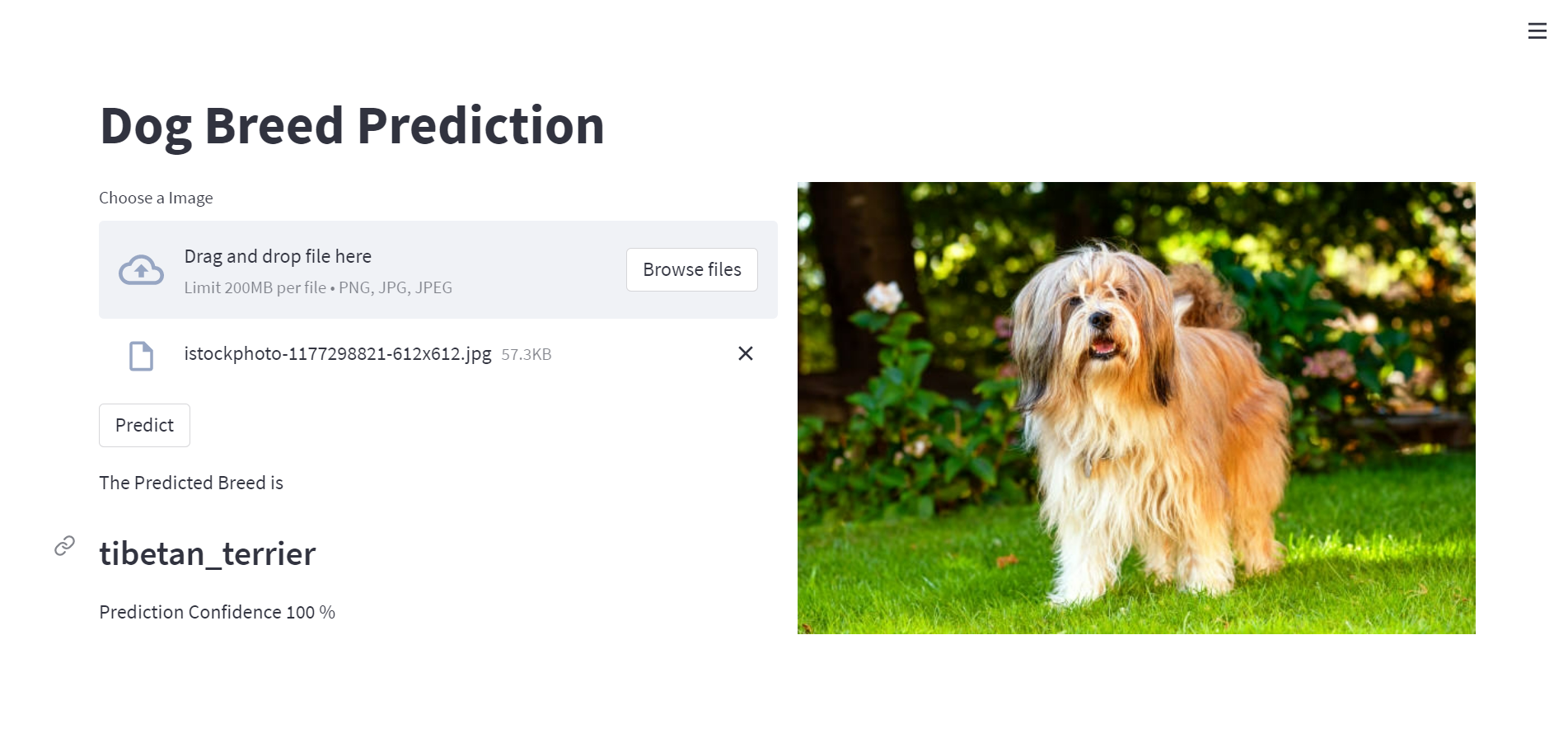
Now this is not enough for describing my project. Let’s dive deeper.
Collecting Data
This data is collected from Kaggle using Kaggle API. For accessing Kaggle API, we need to go first in our profile in Kaggle and download a .json file containing our username and an api key. this file is necessary for accessing the Kaggle API. After that, we will install Kaggle API using pip installation and setting up kaggle using Kaggle API.
# install the Kaggle API client.
!pip install -q kaggle

# The Kaggle API client expects this file to be in ~/.kaggle, so move it there.
!mkdir -p ~/.kaggle
!cp kaggle.json ~/.kaggle/

# This permissions change avoids a warning on Kaggle tool startup.
!chmod 600 ~/.kaggle/kaggle.json
After that setup, we make a directory where we store our data after downloading from kaggle. Here I named that directory as dog_dataset.
# Creating directory and changing the current working directory
!mkdir dog_dataset
%cd dog_dataset
Now let’s search for our dataset. Searching Kaggle for the required dataset using search option(-s) with title ‘dogbreedidfromcomp’. We can also use different search options like searching competitions, notebooks, kernels, datasets, etc.
# Searching for dataset
!kaggle datasets list -s dogbreedidfromcomp
After running this, our output will look something like this —

It seems that we found our required data. Now we download that data and unzip it. we are also remove the irrelevant files.
# Downloading dataset and coming out of directory
!kaggle datasets download catherinehorng/dogbreedidfromcomp
%cd ..

# Unzipping downloaded file and removing unusable file
!unzip dog_dataset/dogbreedidfromcomp.zip -d dog_dataset
!rm dog_dataset/dogbreedidfromcomp.zip
!rm dog_dataset/sample_submission.csv
That’s for our data collections. Now let’s jump into data preprocessing.
Data Preprocessing
At first we import some of the required library.
# Important library imports
import numpy as np
import pandas as pd
import matplotlib.pyplot as plt

from tqdm import tqdm
from keras.preprocessing import image
from sklearn.preprocessing import label_binarize
from sklearn.model_selection import train_test_split
from keras.models import Sequential
from keras.layers import Dense, Dropout, Flatten, Conv2D, MaxPool2D
from tensorflow.keras.optimizers import Adam
Next, we load the labels data into dataframe and viewing it. Here we analysed that labels contains 10222 rows and 2 columns.
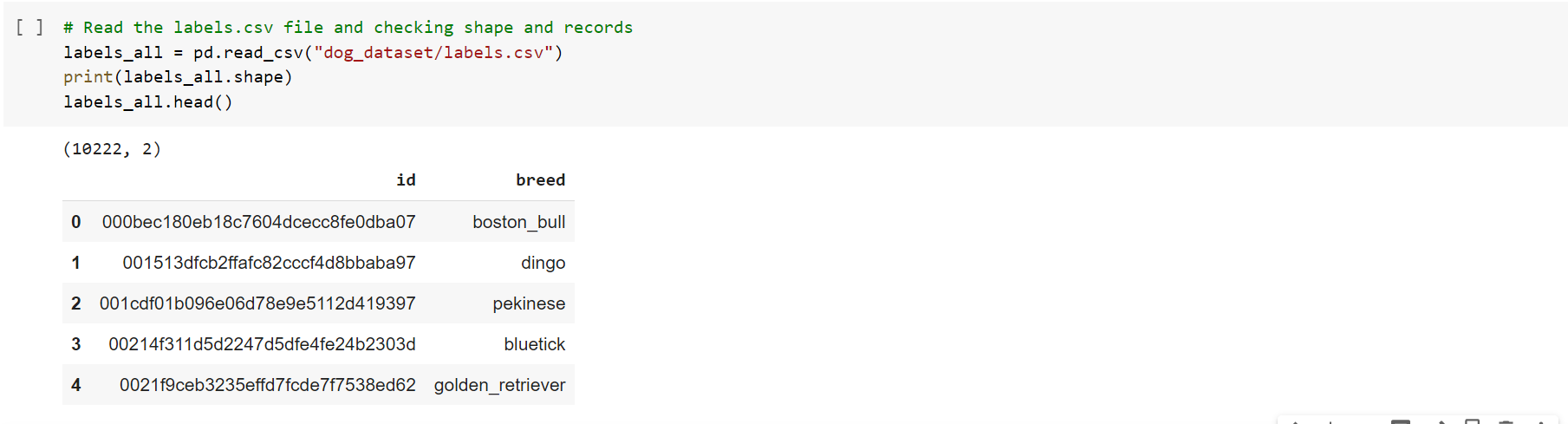
As we are working with the classification dataset first we need to one hot encode the target value i.e. the classes. After that we will read images and convert them into numpy array and finally normalizing the array.
# this will sort the dog breed list and display the total number of unique breeds
classes = sorted(list(set(labels['breed'])))
n_classes = len(classes)

print("Total Unique Breed: ", n_classes)


# one-hot encoding the breeds
class_to_num = dict(zip(classes, range(n_classes)))


# function for converting images into numpy array
input_size = (331,331,3)

def images_to_array(directory, label_dataframe, target_size = input_size):

  image_labels = label_dataframe['breed']
  images = np.zeros((len(label_dataframe), 331, 331, 3), dtype = np.uint8)
  y = np.zeros((len(label_dataframe), 1), dtype = np.uint8)

  for index, image_name in enumerate(tqdm(label_dataframe['id'].values)):

    img_dir = os.path.join(directory, image_name + '.jpg')

    img = image.load_img(img_dir, target_size = target_size)

    images[index] = img

    dog_breed = image_labels[index]

    y[index] = class_to_num[dog_breed]

  y = to_categorical(y)

  return images,y
Now we have the desired format of images. Now we can jump into model training process.
Model Training
Here I am using Transfer Learning. For extracting the features from images, I am combining 4 types of CNN model. those are - InceptionResnetV2, InceptionV3, Xception and NasNetLarge. Those models are previously trained on a large dataset named Imagenet and already available in keras package. all we need to do is just import those models.
# Importing the models
from tensorflow.keras.applications.inception_resnet_v2 import InceptionResNetV2, preprocess_input as resnet_preprocess
from tensorflow.keras.applications.inception_v3 import InceptionV3, preprocess_input as inception_preprocess
from tensorflow.keras.applications.xception import Xception, preprocess_input as xception_preprocess
from tensorflow.keras.applications.nasnet import NASNetLarge, preprocess_input as nasnet_preprocess
from tensorflow.keras.layers import concatenate

input_shape = (331,331,3)
input_layer = Input(shape=input_shape)


preprocessor_resnet = Lambda(resnet_preprocess)(input_layer)
inception_resnet = InceptionResNetV2(weights = 'imagenet',
                                     include_top = False, input_shape = input_shape, pooling = 'avg')(preprocessor_resnet)

preprocessor_inception = Lambda(inception_preprocess)(input_layer)
inception_v3 = InceptionV3(weights = 'imagenet',
                           include_top = False, input_shape = input_shape, pooling = 'avg')(preprocessor_inception)

preprocessor_xception = Lambda(xception_preprocess)(input_layer)
xception = Xception(weights = 'imagenet',
                    include_top = False, input_shape = input_shape, pooling = 'avg')(preprocessor_xception)

preprocessor_nasnet = Lambda(nasnet_preprocess)(input_layer)
nasnet = NASNetLarge(weights = 'imagenet',
                     include_top = False, input_shape = input_shape, pooling = 'avg')(preprocessor_nasnet)

#Merging the models
merge = concatenate([inception_resnet, inception_v3, xception, nasnet])
model = Model(inputs = input_layer, outputs = merge)
The feature extraction model will look like this.
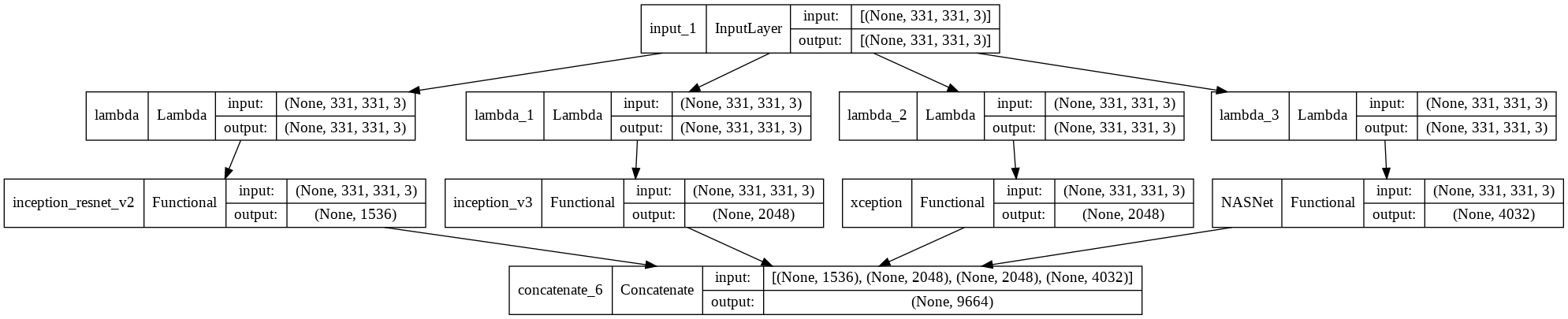
here we exclude the fully connected layer.
Now we define some variables. I am using EarlyStopping to ignore the risk of overfitting the model.
lrr = ReduceLROnPlateau(monitor = 'val_loss', factor = 0.01, patience = 3, min_lr = 1e-5, verbose = 1)
EarlyStop = EarlyStopping(monitor = 'val_loss', patience = 10, restore_best_weights = True)

batch_size = 128
epochs = 50
learn_rate = 0.001
sgd = SGD(learning_rate = learn_rate, momentum = 0.9, nesterov = False)
adam = Adam(learning_rate = learn_rate, beta_1 = 0.9, beta_2 = 0.999, epsilon = None, amsgrad = False)
After that, we pass the image array to the previously combined model and then we pass the extracted output to the fully connected layer which we will make now.
# Passing the image array in feature extractor model
feature_maps = model.predict(X, verbose=1)


# making fully connected layer and pass the extracted output
from tensorflow.keras.layers import Dropout
from tensorflow.keras.models import Sequential

dnn = Sequential()
dnn.add(Dropout(0.7, input_shape = (feature_maps.shape[1],)))
dnn.add(Dense(n_classes, activation='softmax'))

dnn.compile(optimizer = adam, loss = 'categorical_crossentropy', metrics=['accuracy'])

history = dnn.fit(feature_maps, y, batch_size = batch_size, epochs = epochs, validation_split = 0.2, callbacks=[lrr,EarlyStop])
after training the model, now we can see how good our model perform by comparing the training accuracy and validation accuracy.
plt.figure(figsize=(12,8))
plt.plot(history.history['accuracy'], color = 'r')
plt.plot(history.history['val_accuracy'], color = 'b')
plt.title("Model Accuracy")
plt.xlabel("Epochs")
plt.ylabel("Accuracy")
plt.legend(['train','val'])
plt.show()
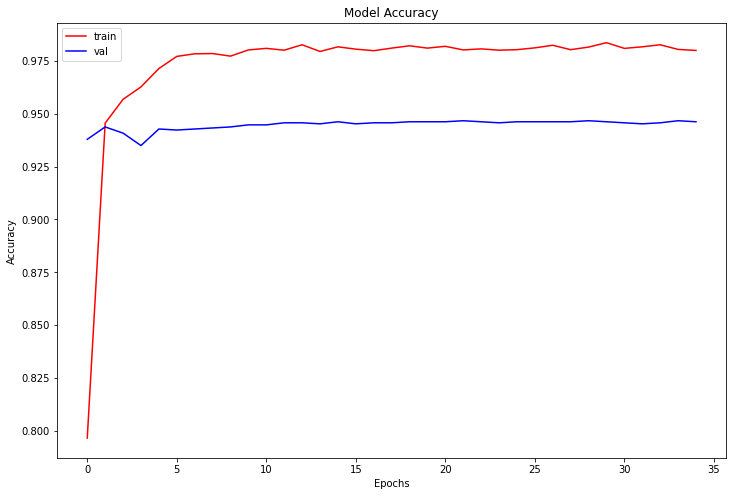
it seems that model is performing well but it can be tuned further.
now let’s test one image. I choose a image of a gold retriever.
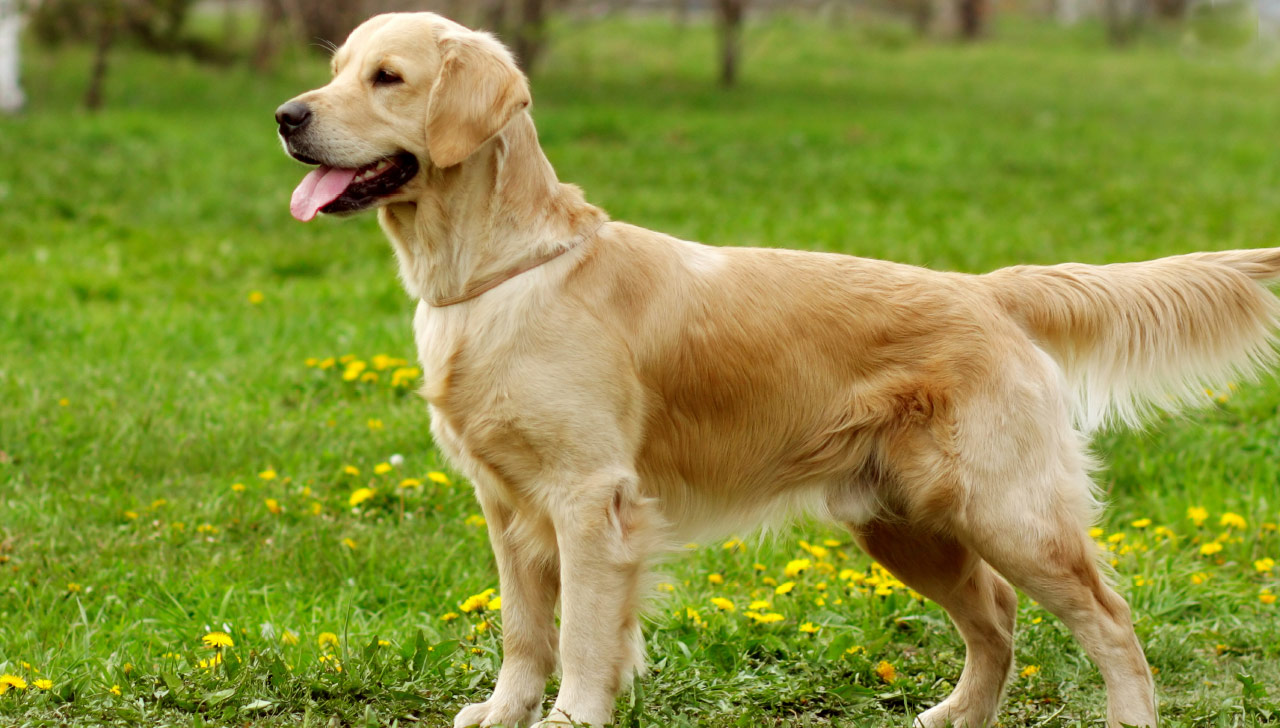
img_size = (331,331,3)
img_g = image.load_img("golden_retriever.jpg", target_size=img_size)
img_g = np.expand_dims(img_g, axis = 0)

test_features = model.predict(img_g)
predg = dnn.predict(test_features)
print(f"Predicted label: {classes[np.argmax(predg[0])]}")
print(f"Probablity of prediction: {round(np.max(predg[0])) * 100} % ")

that’s great. it predicts gold retriever 100%.
That’s all for this.